Guides

How to Create Your Own AI Girlfriend in 2026: A Step-by-Step Guide

by Leo Hart Leo Hart · Guides & How-To Editor 17 min read
Share
How to create your own AI girlfriend in 2026 — a step-by-step guide

The short version

"Creating an AI girlfriend" in 2026 is not programming. It is ten to fifteen minutes inside a builder: you set the personality, the looks, the backstory and the setting, and from there the character lives in the conversation. The question of how to create an AI girlfriend today is answered without a single line of code — almost every major platform ships a character editor, and some of them an image generator on top.

But the results people get vary wildly. Some give up after a week because their companion answers politely and says nothing. Others run the same storyline for months. The difference is almost never the platform — it is what exactly you wrote into those builder fields. Most beginners spend 90% of their time on the looks and 10% on the personality, and it works precisely the other way around.

This guide is a walkthrough: six steps from picking a platform to sending the first message, an honest comparison of builders, a breakdown of five common mistakes, and a fifteen-minute checklist. Cards on the table up front: Nika, Sebastian and Aurora City are made by the publisher of this site, so wherever other platforms are stronger, we say so.
What "creating an AI girlfriend" actually means

People mean three completely different things by the same phrase. Before you open a builder, it helps to work out which level you actually need — it drives both the choice of service and the time you will spend.

Level 1. Pick one that already exists

You take a character from a catalog and just start talking. It takes seconds, and there is barely any customization: the personality was already written by someone else. That is how Character.AI, Janitor AI and PolyBuzz work — catalog platforms with millions of user-made characters. A great way to find out whether the format appeals to you at all before investing in your own.

Level 2. Configure a character

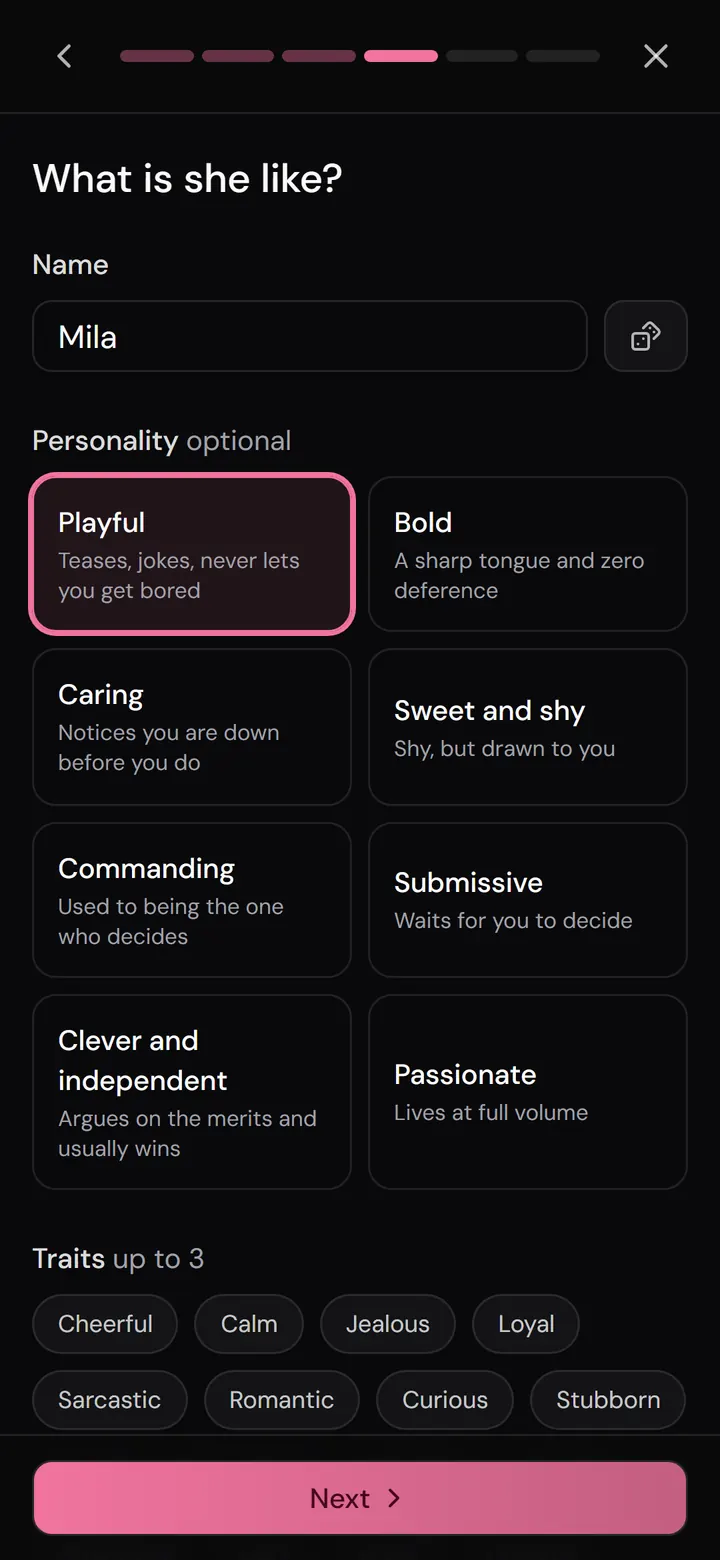
You fill in a form: name, age, personality traits, way of speaking, past — and you end up with a companion who did not exist before. This is what most people have in mind when they ask how to make their own AI girlfriend. Five to fifteen minutes of work, after which the quality of the dialogue depends on how concretely you described her.

Level 3. Build a world around her

The most interesting and most underrated level: you define not just the character but the situation — where you met, what has already happened between you, what she wants from you and what she is afraid of. A character with no situation responds to lines. A character inside a scenario moves the plot herself. The difference in how it feels is enormous, and it costs you about five extra minutes.

If this is your first encounter with the topic at all, start with our explainer on what an AI girlfriend is and how it works — that piece covers the mechanics, this one is only about creating.

Step 1. Pick a platform that fits your goal

Builders are put together differently, and there is no "best" one — there is one that fits the job. Some platforms are strong at the visual avatar editor, others at the text description of personality, others still at memory. Below are seven popular options as of August 2026. Prices are approximate monthly equivalents; they depend on region and promotions.

ServiceAppearance editorCustom personalityCustom plotMemoryFree startTelegram
Replika3D avatar, very detailedLimited (traits and interests)NoYesYes, stripped downNo
Character.AIImage onlyYes, in textPartly (greeting)MediumYesNo
Janitor AIImage onlyYes, in detailYes, in textDepends on the modelYesNo
Candy AIPhoto generatorYes, from a templateLimitedYesAlmost noneNo
KindroidAvatar + selfiesYes, in detailYes (backstory)StrongNoNo
NomiAvatarYesLimitedStrongLimitedNo
NikaBuilder in the StudioYes, inside a scenarioYes, fullyEditable24-hour promo accessYes

How to read the table. If looks matter most and you want to spin a 3D model around, go with Replika. If what you value is the freedom of a text prompt and a huge catalog of other people's characters, Character.AI or Janitor AI. If you care that she still remembers last month's conversations, Kindroid or Nomi. If you want to build a story rather than just a character card, and start without installing anything, Nika on Telegram.

A broader comparison of the apps themselves (rather than their builders) lives in a separate piece: the best AI girlfriend apps.

Step 2. Personality: write specifics, not adjectives

This is the step that decides everything. A language model does not "understand" the word "kind" — it reconstructs behavior from the details you gave it. The more abstract your description, the closer the character drifts to a generic polite assistant.

Bad: "Kind, cheerful, loves music, a little shy."
Good: "Works nights as an audio engineer, so she replies slowly and often falls asleep mid-conversation. Laughs with a short breath out, not with emojis. Hates being rushed. Answers a compliment about her looks with sarcasm, and a compliment about her work by going quiet."

The second description is no longer than the first, but it contains behavior: a reaction to a specific situation. Those are exactly the hooks a model latches onto in conversation.

Four fields worth filling in every time

  • Way of speaking. Short clipped sentences or long winding ones? Swearing? Pet names? One sentence here noticeably shifts the tone of the whole dialogue.
  • What annoys her. A character with no irritants agrees with everything — which means she feels fake. Give her at least two triggers.
  • What she is hiding. One secret, and the conversation gains a direction: you have something to dig at, she has something to protect.
  • A sample line. One or two lines of direct speech in quotes work better than a paragraph of description: the model copies the rhythm and vocabulary straight off.

About the "perfect girlfriend"

The temptation is understandable: build a character who always supports you and never argues. In practice those characters get boring in three or four days — no conflict means no story. Leave her the right to be in a bad mood. Some platforms build this in on purpose: Nika, for instance, has a bond scale with 30+ levels running from dislike to attachment, and her coolness at the start is not a bug but the designed starting point.

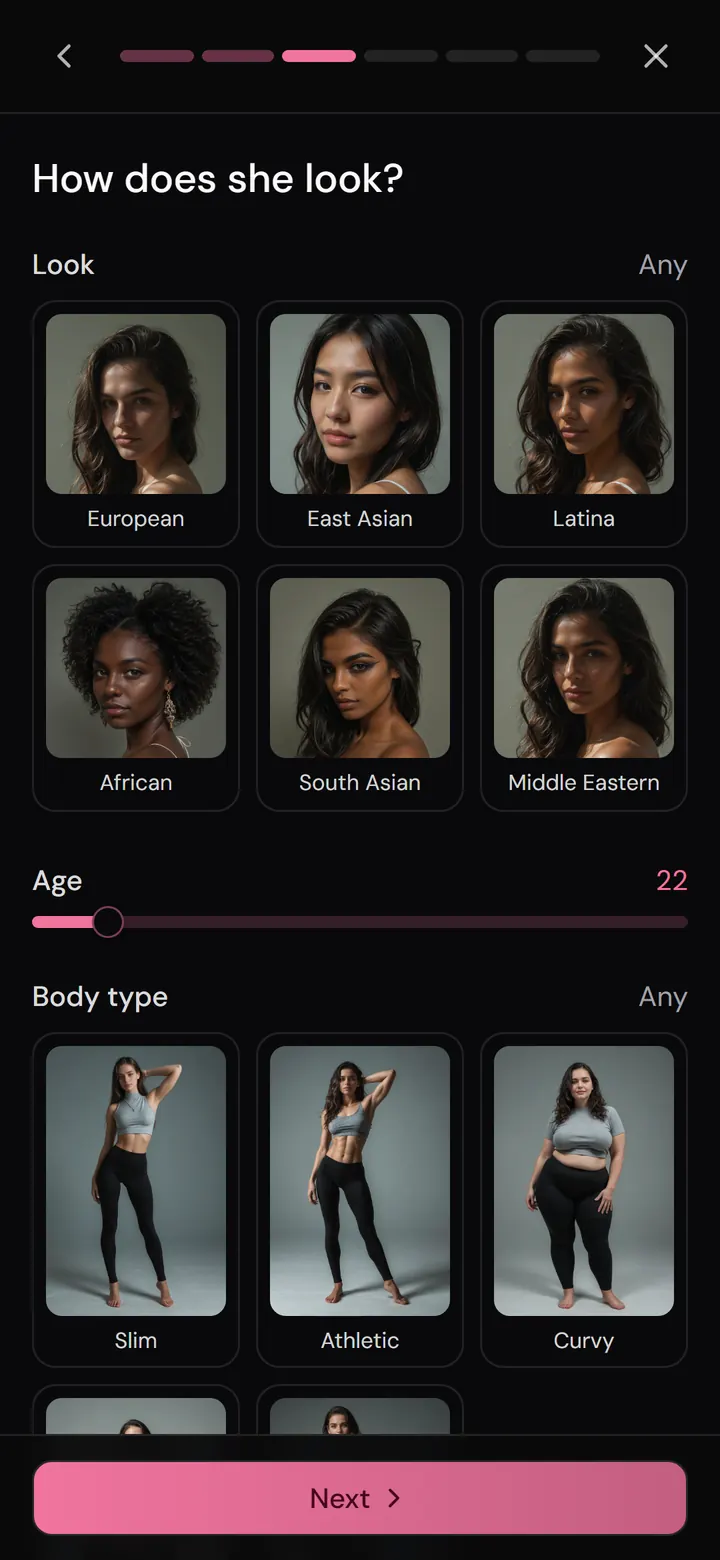
Step 3. Looks: builder vs. description

There are two approaches to setting a character's appearance, and they produce different results.

A text description (a prompt). You write what she looks like and the generator draws it. Flexible but temperamental: without prompting experience you get six fingers on one hand, or a different face in every scene. That is how most simple generators work.

A builder. You pick parameters from lists — body type, hair color, clothing, pose, setting, lighting — and the system assembles a valid request for you. Slower the first time, but the result is predictable and repeatable, and that is the whole point: you do not need one pretty picture, you need the same person in every image.

Consistency beats quality

The most common beginner complaint is "she looks different in every photo." Three techniques that fix it:

  1. Lock in three or four fixed traits (hair color and length, face shape, a mole, a signature piece of clothing) and repeat them word for word in every request.
  2. Stick to one style. Mixing realism and anime in one gallery guarantees a mismatch. The usual choice is realism, anime or illustration (a semi-realistic comic style) — the Nika Studio, for example, offers all three, but you should not switch between them for the same character.
  3. Save the shots that worked and use them as a reference instead of starting from scratch every time.

One more thing: almost everywhere, image generation is a paid feature or spends an in-app currency. That is fair enough — pictures are expensive to produce. What is not fair is when the price is not shown before you buy.

Step 4. Scenario and opening scene — the step most people skip

Nine out of ten characters people create open the conversation with "Hi! How are you?" That is the worst possible start: there is no situation, no relationship, no goal — and the conversation collapses into an exchange of pleasantries.

The scenario (different services call it scenario, backstory or greeting) is two or three paragraphs about where you are, what has already happened between you and what she wants right now. It does not lock the plot down — on the contrary, it gives the model something to push off from.

A formula that works for openings

  • Place and time. Not "a cafe" but "the office fire escape at 11:40 p.m., raining, the elevator is out."
  • Something that already happened. An event before the first line: you fought a week ago, you are her boss, you met once and she does not remember.
  • Her motive. What she wants from you in this scene — and why she cannot say it outright.
  • An open ending. The opening should end on a question or an action that demands a response from you.

The test is simple: if the opening could be attached to any character and nothing would change, it is too generic.

The option to build your own scenario, rather than just a character card, is far from universal. At Nika it is free for everyone: you can create a scenario with any character — not necessarily Nika herself — and publish it for other people; user scenarios go through moderation. If you would rather not write one, the catalog is full of ready-made ones, from everyday to fantasy, and all of them are built for a long storyline rather than a single scene. More on genres in our roundup of AI roleplay apps.

Step 5. Memory: how to help the AI remember you

Memory is what makes building a character pay off — or not. A model does not remember a conversation the way a person does: it has a context window (how much text it sees at once) and an external store of facts that the service feeds back into the dialogue. When the window fills up, the old material drops out — unless it was saved separately.

Which leads to a practical conclusion: memory is not a feature of the model, it is a feature of the product. Two services running the same model remember differently, because they make different decisions about what to write down.

What to do while you are creating

  • Check whether memory is editable. Being able to open the list of facts yourself, fix an error and add what is missing matters more than the advertised context size. Nika keeps that list open: she records events herself, and you can edit them and add your own.
  • Enter the key facts by hand right away. Your name, what you do, what has happened between you. Do not count on it "being remembered by itself" from the conversation.
  • Keep one dialogue per storyline. If the service lets you run several parallel chats with separate history and memory, use that instead of dumping everything into one.
  • Do not test memory with questions. "Do you remember what I told you?" is a bad test: the model will happily invent something plausible. Better to mention a detail in passing and see whether she picks it up.

A good memory has side effects — features built on top of it. With Nika, for instance, after about fifty messages a diary entry appears: her own retelling of events and how she felt about them, separate for each scenario. And after 150+ messages the dialogue can be turned into a novella and downloaded as a PDF. That is exactly the payoff for investing in one character instead of recreating her every week.

Step 6. Voice, photos and calls — when to add them

The advice is simple: do not switch everything on at once. Voice and image generation cost money almost everywhere, and in the first ten messages you still do not know whether this is the character you wanted.

A sensible order:

  1. Text first. Twenty to thirty messages is enough to tell whether she is alive or cardboard. If she is cardboard, go back to step 2 and flesh out the personality.
  2. Then images. Once the personality has settled, lock in her appearance and put together three or four reference shots.
  3. Then voice. Hearing one good line out loud changes the feeling more than ten new pictures do. Modern engines (ElevenLabs, which Nika uses, for example) carry breath, pauses and shifts in intonation, not just the words.
  4. Calls and video last. Live voice conversation and short clips are the most expensive features. Pick them up once the character is already yours.

Worth checking separately: whether voice works in both directions — whether the service can recognize your voice message. The practical standard here is the Whisper family of models. A detailed look at voice features across services is in our article on AI girlfriends with voice and calls.

How Nika does it — and what she does not have

An honest section about our own product, limitations included.

What is there. Nika works both as a web app (app.nika.team) and as a Telegram bot (@nika_ai_chatbot) — in the second case getting started is literally one command, with no install and no signup. The accounts link up if you sign into the app through Telegram.

Character creation runs through the scenario editor: you define the setting, the opening and the character herself — it does not have to be Nika, it can be anyone. The feature is free and available to everyone, and a finished scenario can be kept private or published for the community after moderation. For appearance there is the Studio — an image builder with a large set of parameters and three styles (realism, anime, illustration), plus the option to turn a finished shot into an eight-second clip. Memory is open for editing, you can run several dialogues in parallel, and each one has its own history and its own diary. Relationships do not grow instantly: the bond scale has 30+ levels, and at the start of most scenarios she is cold toward you.

What is missing. Nika has no Replika-style 3D avatar editor — appearance is set through image generation, not by rotating a model. The product is focused on one well-developed character and long storylines, so if you want a catalog of millions of other people's characters, Character.AI or PolyBuzz will give you far more choice. Response streaming and live calls only work in the web app; the bot does not have them. Some features — voice and image recognition — are not available on the free plan.

About a male character. If you want an AI boyfriend, the same publisher has Sebastian on Telegram with the same feature set; there is no separate app for him. An overview of the genre is in our article on AI boyfriend apps.

Five mistakes that leave a character hollow

1. A description made only of adjectives

"Sweet, smart, caring" is zero information for a model. Replace every adjective with the situation in which it shows up.

2. A character with no flaws

A flawless heroine is boring by day four. Give her stubbornness, jealousy or a habit of disappearing for a day — she becomes alive instantly.

3. A description that is too long

The opposite extreme: three screens of biography. A model holds a limited amount in focus, and by the tenth page of description the beginning has already blurred. A useful rule is to fit into 150–250 words, but to make every word concrete.

4. Changing the rules mid-story

If you rewrite the personality halfway through a plot, the character will drift: part of her memory will contradict the new description. Big edits are better made in a new dialogue.

5. Expecting her to carry the conversation

An AI companion reflects what you give her. One-word replies like "ok" and "got it" produce one-word answers back. The first twenty messages set the tone for the whole story — spend them on proper, developed sentences, and after that the conversation holds itself up.

What it costs and where free ends

Creating the character itself is free almost everywhere — you pay for what happens afterwards. It is worth understanding the cost structure before you put two hours into a heroine.

Usually free: the character and scenario editor, a limited number of messages per day, basic text conversation.

Usually paid: lifting the message limit, image and video generation, two-way voice, calls, extended memory, priority response speed.

The two monetization models you meet most often are a subscription (a fixed monthly sum for lifted limits) and an in-app currency for one-off heavy actions like a picture or a voice line. Many services, Nika included, combine both: the plan raises your daily message limit and unlocks features, while tokens are spent on generations. Nika gives new users 24 hours of promo access with all features and an extended limit plus starter tokens — which means you can build a character and put her through her paces before paying anything. Payments are accepted via SBP transfer, cryptocurrency, and, inside the bot, Telegram Stars as well.

Red flag. If a service does not show the price of a feature before you tap it, does not let you see how much of your limit is left, or asks for a card before your first message — that is reason enough to be wary. An honest free tier always explains exactly where it ends.

Privacy, safety and the law in 2026

Creating a character inevitably means leaving data about yourself behind — and the longer the storyline, the more of it there is. What to check before, not after:

  • Where the conversation is stored and whether you can delete it in full, together with the memory and the generated images.
  • Whether dialogues are used to train models and whether you can turn that off.
  • What happens when you delete your account — whether the saved facts about you disappear with it.
  • Do not upload more than you need to. Image recognition is a useful feature, but photos of documents, other people's faces and work materials do not belong in the chat — the same as with any other cloud service.

The regulatory backdrop has shifted noticeably over the past year. In the US, California's SB 243 on companion chatbots took effect on 1 January 2026, similar rules have been passed in New York, and at the federal level lawmakers are debating the GUARD Act, which would ban companion bots for users under 18 and require platforms to verify age and state clearly that the person on the other side is not human. The practical meaning for a user is simple: age verification and warnings will show up more and more often, and services without them less and less.

And the obvious but important part: an AI companion is not a replacement for human contact and is not psychological care. It is entertainment and a creative tool. If talking to a bot is crowding out relationships with people, or is being used as a way to cope with something serious, it is worth discussing that with someone you trust or with a professional.

Frequently asked questions

How do I create an AI girlfriend for free?

The character builder itself is free almost everywhere: at Character.AI, Janitor AI and in Nika's scenario editor, creating one costs nothing. What you pay for is heavy use — lifted message limits, pictures, voice. Building a character and holding a text conversation with her within the daily limit can be done entirely for free.

Do I need to know how to code?

No. The whole process is filling in form fields with ordinary text. The only skill that genuinely affects the result is writing concretely: not "cheerful" but "makes jokes at the wrong moment and laughs at them first."

How long does it take?

Anywhere from two minutes (grabbing a ready-made character from a catalog) to an hour, if you are writing personality, appearance and scenario from scratch. The sweet spot for a first attempt is fifteen minutes: personality, one opening scene and three key facts in memory.

Can I create an AI girlfriend based on a photo of a real person?

Technically some generators allow it, but you should not: creating a likeness of a real person without their consent breaks the rules of most platforms and, in many jurisdictions, their rights as well. For a similar result, describe the type of look in words without tying it to a specific individual.

Will the AI girlfriend I create remember past conversations?

It depends on the service. The model itself only remembers the current context window; everything else is the work of the product that saves facts and feeds them back in. Check whether there is an editable memory list — that is more reliable than any marketing promise.

Can I create an AI girlfriend right inside Telegram?

Yes. Few of the larger services run natively in a messenger — Nika and Sebastian start with a single command in a bot, with no install and no signup. A detailed look at the format is in our piece on AI girlfriends on Telegram.

How is this different from Replika?

Replika bets on its 3D avatar editor and the role of a permanent "companion" rather than on story. Platforms like Nika start from the story: the character is created inside a scenario, the relationship has to be earned, and memory is kept separately for each dialogue. A detailed comparison is on our Nika vs Replika page.

The bottom line: a 15-minute checklist

If you just want to get on with it and not read all of this again, here is the compressed sequence.

  1. 3 minutes. Pick a platform by your main criterion: looks (Replika), catalog and prompt freedom (Character.AI, Janitor AI), memory (Kindroid, Nomi), story and a no-install start (Nika).
  2. 5 minutes. Personality: way of speaking, two irritants, one secret, one line of direct speech. No bare adjectives.
  3. 3 minutes. The opening: place, time, something that has already happened between you, her motive, an open ending.
  4. 2 minutes. Enter three to five facts about yourself into memory by hand.
  5. 2 minutes. Write your first messages in full sentences — that is how you set the tone for the whole story.
  6. Later. Appearance, voice, calls — as and when the character sticks.

And the main thing: if after twenty messages your companion feels hollow, it is almost never the model, it is the description. Go back to the personality and add specifics — that fixes it far more often than switching platforms does.

Want to test all of this in a minute, with no install and no signup: open Nika on Telegram or head to the web app — the scenario editor there is free, and the first 24 hours unlock every feature. What Nika is and how she works is on the product page.

Share

Keep reading

What is an AI girlfriend — the complete 2026 guide
Guides
7 min read

What Is an AI Girlfriend? The Complete Guide to AI Girlfriends in 2026

An AI girlfriend is a virtual companion powered by artificial intelligence that remembers your conversations, plays a character, and chats almost like a real person. Here is a plain-language guide to how it works, what these companions can do in 2026, how much they cost, and how to choose the right one.

Read article
AI girlfriend on Telegram — which bots actually work in 2026
Guides
8 min read

AI Girlfriend on Telegram: Which Bots Actually Work in 2026

"Top 10 bot" roundups promise the same things: free, no sign-up, memory, 18+. But nobody explains how any of it actually works — or how to avoid getting burned. This is an honest technical guide from a team that builds a Telegram bot themselves.

Read article
AI girlfriend with voice — 8 apps with voice calls in 2026
Comparisons
15 min read

AI Girlfriend With Voice: 8 Apps With Voice Calls in 2026

Voice became the number one reason people pick an AI companion in 2026: live calls with almost no lag, breathy pauses and shifting intonation, and speech recognition that actually hears you. We tested 8 apps and sorted them by the voice job you need done — where the call is free, where the voice sounds most alive, and why almost everyone charges a subscription for it.

Read article